
Product records with a public proof of when
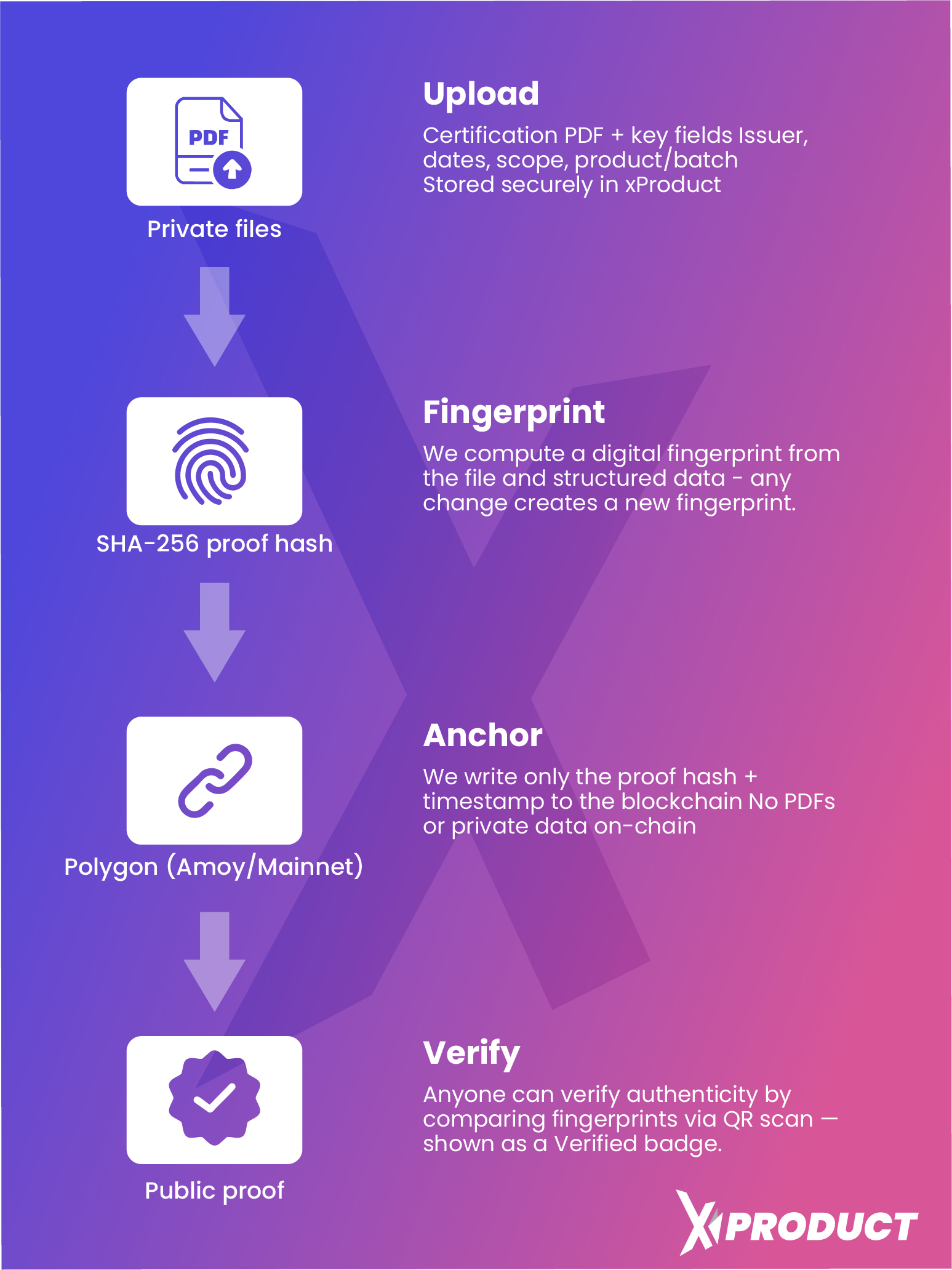
xProduct writes short fingerprints of your certificates and product records to the Polygon public blockchain. The documents stay private. Anyone can open the record and see when it was made. The manufacturer's integrity report lets an auditor check that the product ledgers still match.
Certificates one by one, and one daily record of every product ledger in your account.
A SHA-256 fingerprint. It does not reveal your data; it can only be matched by someone who already has the same data.
Per account, and only on days when something changed.
xProduct pays the network fee from its own account.
01/Privacy
What goes on the chain, and what never does
A blockchain is public and cannot be cleaned up later. So xProduct writes only a fingerprint: a SHA-256 hash of the data, 32 bytes long. The same data always gives the same fingerprint, and a one-letter change gives a completely different one.
On the chain
- One 32-byte fingerprint per record, as the transaction's input data
- The block and its time, which show the fingerprint existed no later than then
- A transaction of 0 POL from xProduct's own address to itself, with no smart contract
- The Polygon PoS main network, readable by anyone on Polygonscan
Never on the chain
- Certificates, test reports or any other file
- Passport data, prices or other business details
- Personal data: no names and no e-mail addresses. A ledger entry records who made a change by a user number only, and that number goes into the fingerprint too
- Buyers' warranty registrations or scans
02/Two kinds of record
Certificates on request, product ledgers every night
Both kinds use the same network and the same kind of fingerprint. They differ in what they cover and when they are made.
A certificate record
One fingerprint of one certificate: its number, title, standard, issuer, scope, notes and valid-from and valid-until dates, written as a fixed text. Since 15 October 2026 the last line of that text is the fingerprint of the PDF itself, so the record covers the file as well.
- Press “Anchor on blockchain” in the web app or in the Shopify app
- Uploading a certificate does not anchor it by itself: you choose
- When a renewed certificate replaces one that was anchored, the new one is anchored automatically
- Records made before 15 October 2026 cover the details only, and still check as “details only”
A daily ledger record
One fingerprint for your whole account: the root of the latest ledger entry of every product that passed that night's check. Because each entry carries the fingerprint of the one before, the record covers every earlier entry too.
- Nothing to press: it runs for every account with product ledger entries
- Written only on days when something changed, so at most one a day
- Covers products made in the web app and in the Shopify app alike
- Section saves, attached certificates, publishing, transfers and approved partner events are ledger entries, so the daily record covers them
03/The product ledger
Every change is an entry, linked to the one before
Each product has its own ledger. Creating it, saving a section, attaching a certificate, publishing, a transfer or an approved partner event: each adds an entry. A translation or a variant writes to its main product's ledger.
Each entry has a SHA-256 fingerprint of the product, the kind of event, the time to the second (UTC), who made it, the place, the data, and the fingerprint of the entry before. Change, remove or reorder one entry and the chain breaks at that point.
Tamper-evident means a change can be seen, not that it is impossible. The app has no screen that edits or deletes ledger entries, and a changed entry fails the check and is left out of that night's record. It does not make the data correct: what a passport says remains the manufacturer's statement.
- Linked entries — change an old entry and its fingerprint, and every link after it, no longer match.
- Who and when — each entry records the kind of user and a user number, never an e-mail address.
- Checked when you open it — the ledger page checks the whole chain when it opens, with a “Check again” button and a CSV audit report.
- Ledger health — one page for the whole account: a full check on demand, the last nightly check, the last daily record with its proof link, and an integrity report (PDF).
04/Every night
What happens while you sleep
Once a night xProduct checks every product ledger of every account, then writes the daily record. Demo accounts are left out.
- 01
Check every chain
Every fingerprint of every product ledger is worked out again, from the first entry to the last, and compared.
- 02
Save the result
The run is saved and shows on Ledger health as the last automatic check, product by product.
- 03
Tell the owner
If a product fails the check, the account is told by e-mail.
- 04
Write one record
If anything changed since the last record, one transaction is written for the account: the root of every product that passed.
The product shows as Failed, at the entry where the chain breaks
A changed entry fails the check, and the product is left out of that night's record. Records already on the chain do not change, and Ledger health shows each product as up to date or as changed since the date of the last record.
Your work never waits for the blockchain
- Saving a passport and writing the ledger never wait for the network.
- A daily record that could not be sent is tried again the next night, by itself.
- A daily record still waiting for its block gets the block number on the next run.
- A certificate record that could not be sent shows as Failed with the reason; press Anchor again. One not yet confirmed shows as Pending.
05/Check it yourself
From the passport to the proof, without an account
Polygonscan is a public explorer run by others, and the maths is standard SHA-256, so the time of each record does not depend on xProduct.
A certificate record, from any passport
- 1Scan the code on the product, or open its passport page.
- 2Look for “Certificate recorded on the blockchain” with a block number. Press “View blockchain proof”.
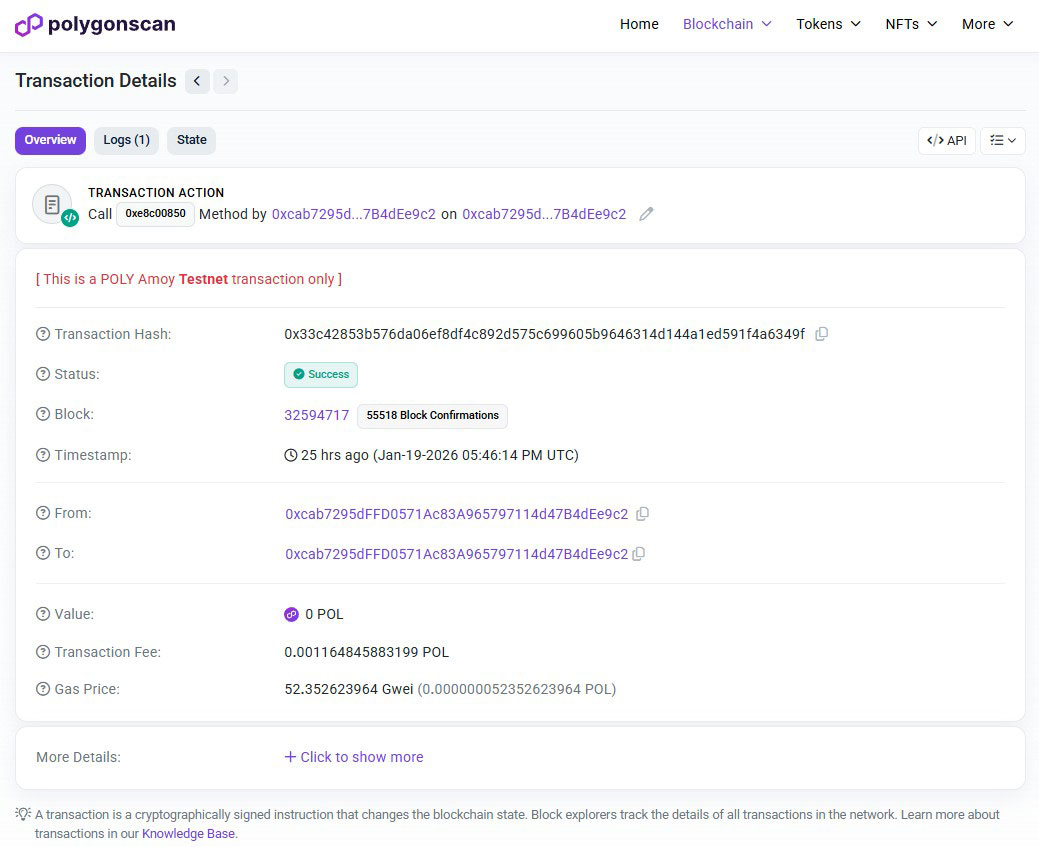
- 3Polygonscan opens the transaction. Check the status says Success and note the date and time.
- 4Open “More details”: the input data is the 32-byte fingerprint of the certificate's details and, since 15 October 2026, of its PDF.
A daily ledger record, with the integrity report
The daily record is not shown on the passport. Ask the manufacturer for the integrity report from Ledger health. It lists one line per product and the proof link.
lines = product:entry:hash   (one per product, by product number)
text  = the lines joined with a line break
root  = SHA-256(text)
check: root = the transaction's input data
Live example
A real passport with an anchored certificate, and the record behind its badge on the Polygon main network.
06/On the passport
What the blockchain badge means, and what it does not
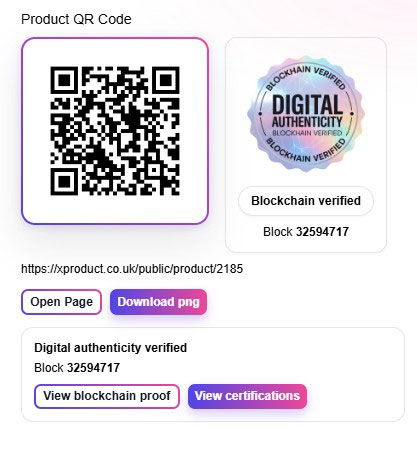
The badge shows on a public passport when a certificate attached to the product, still in force, has a confirmed record on the blockchain. In a Shopify store, the Passport Highlights block shows the same as “Blockchain-anchored record”. The box next to the badge shows the block number and the proof link.
- It means: the fingerprint of that certificate was on the public blockchain no later than the block's time.
- It does not mean the product, or the whole passport, has been checked by anyone.
- It does not say the certificate is still valid: check its dates in the certificates part of the passport.
- The daily ledger record is not shown on the passport; the manufacturer's integrity report has it.
07/Passport versions
The passport as it read on any date
The ledger says what changed. Versions keep what the passport said, so a buyer, an auditor or an authority can read it as it was on a given day.
- A copy for each real change — about a minute after a save, and in a nightly sweep of published passports, a copy is kept for each access level: public, professional and authority.
- Linked copies — each copy has its own content fingerprint and a link to the copy before it. The database refuses changes to stored versions.
- Open to systems — the public passport API lists the dates and returns the passport as it read on a date, as the EN 18222 call ReadDPPVersionByIdAndDate does, with the passport seal.
- Same access rules — every version is kept for the passport's lifetime and follows the same access rules as the current passport. When a passport is withdrawn, the public sees it as no longer available, while authorities with an approved access link, partners with access and the manufacturer's own team can still read its versions by date.
- Covered by the daily record — versions are not written to the blockchain themselves. The ledger entry for each save is, through the daily record.
08/Two different proofs
Blockchain and the passport seal work together
They answer different questions. The blockchain shows when a record existed. The seal shows that a copy of a passport came from xProduct and has not been changed since.
Blockchain record
A fingerprint on a public network. It shows the data existed in that form no later than the block's time.
- Certificates and product ledgers
- Checked on Polygonscan
- Cannot be backdated
Passport seal
A digital signature (JSON Web Signature, ES256) that xProduct adds to standard passport answers from the API. It is xProduct's platform seal, not the operator's own qualified seal.
- Checked with the public keys xProduct publishes
- Works offline, also for a copy saved months ago
- Designed to follow EN 18246 4.7 (first step)
09/Where the data lives
Data off the chain, fingerprints on it
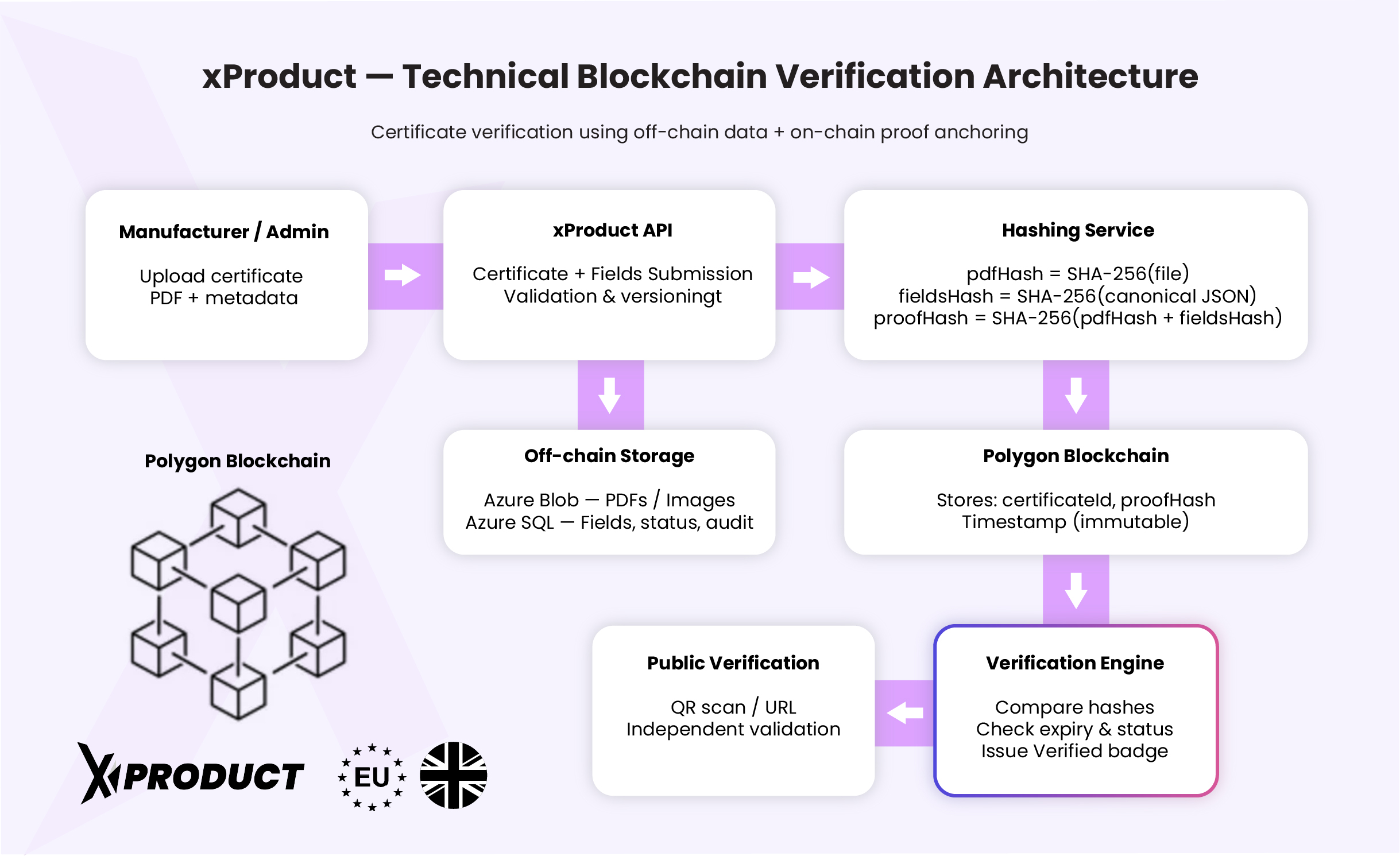
Files are kept in private cloud storage and passport data in xProduct's database. Each site keeps its accounts' files and passport data in its own region (UK or EU), with its own database and nightly job, and makes its records from its own data. A public backup copy of published passports is kept separately.
10/Cost and plans
Included with xProduct, with no fee per record
Every record on the blockchain costs a small network fee in POL. xProduct pays it from its own account. You do not need a crypto wallet, and there is no charge per record.
- No wallet, no tokens and no fee per record for you
- The nightly check and the daily record run for every customer account with product ledger entries
- Ledger health and the product ledger page are on every plan, including Free
- Shopify app: certificates can be anchored and products are in the daily record; Ledger health and the integrity report are in the xProduct web app
11/FAQ
Short answers
For buyers who scan a product, for auditors, and for market surveillance authorities.
For buyers
Does the blockchain badge mean the product is genuine?
No. It means the fingerprint of a certificate attached to the product was on a public blockchain no later than a given time. It does not test the product, and what the passport says remains the manufacturer's statement.
Is anything about me written to the blockchain?
No. Scans, warranty registrations, names and e-mail addresses never go on the chain. Only 32-byte fingerprints of certificates and product ledgers do.
Do I need an account or a crypto wallet to check a record?
No. The “View blockchain proof” button on a passport opens the record on Polygonscan, a public website. No sign-in is needed.
For auditors
What exactly does a daily record prove?
That the latest ledger entry of each product listed in the integrity report, and every earlier entry of that product's chain, existed in that form no later than the block's time. Products that failed that night's check are not in the record.
How do I recompute a daily record?
Take the “product:entry:hash” lines from the integrity report, in product number order, join them with a line break, take the SHA-256 of that text and compare it with the input data of the transaction on Polygonscan.
Could xProduct change an old entry without anyone noticing?
The app has no screen that edits or deletes ledger entries. A change to one entry breaks the chain at that point and shows at the next check. Each daily record fixes the state of every chain on the public blockchain, so a later rewrite, even one that recomputes the chain, no longer matches a record already on the chain. Keep the integrity report to compare against. Entries made since the last daily record are covered from the next record.
What about certificates anchored before 15 October 2026?
Those records cover the certificate's details only, not the PDF. They still check, and are reported as “details only”. Records made since then cover the details and the file.
Are partner and lifecycle events on the blockchain?
Not one by one. When a partner event is approved, it is added to the product's ledger, which the daily record covers.
For market surveillance
Can I see a passport as it read on an earlier date?
Yes. The public passport API lists the dates on which a passport changed and returns the passport as it read on a date you choose, with the passport seal.
Is the passport seal the same as the blockchain record?
No. The seal is a digital signature on passport answers from the API, checked with xProduct's public keys: it shows the copy came from xProduct unchanged. The blockchain record shows when a fingerprint existed.
Which network is used?
The Polygon PoS main network (chain ID 137). Each record is a transaction of 0 POL from xProduct's own address to itself, with the fingerprint as its input data. There is no smart contract.
Are UK and EU records made separately?
Yes. The UK site makes the records of UK accounts from UK data, and the EU site those of EU accounts from EU data. Both write to Polygon.
Records anyone can check, from your first passport
Start on the free plan: your product ledgers are checked every night from the first entry. Or book a demo and we will walk you through a record on Polygonscan.