
You bring it in. The passport names you.
When your company is established in the EU and places a product made outside the EU on the EU market, you are its importer: you check the maker's work, put your name and address on the product and keep the documents. The same goes for a GB company bringing goods from outside the UK onto the GB market. xProduct helps you hold and show that evidence, with the maker and your company named in every passport.
Book a demo Guidance, not legal advice. EU and UK rules as of November 2026.
Import note · example
Teak Folding Garden Chair
- Made in
- Indonesia
- Manufacturer
- Java Teak Works
- EU importer
- Your company, with postal address
- Documents
- Declaration of conformity, test report
- Label
- Both companies, warnings in local language, QR code
 Open the full-size picture
The top of the public passport, as xProduct shows it for an imported product.
- GPSR applies: consumer products in its scope need a responsible company in the EU
- 13 Dec 2024
- EU deforestation rules for wood, rubber, coffee, cocoa and more (details may still change)
- 30 Dec 2026
- Battery passports for EV, LMT and large industrial batteries
- 18 Feb 2027
- usual time to keep the declaration of conformity
- 10 years
The pictures on this page are real screens of a Teams account, taken on 9 November 2026; the product, the maker and the addresses in them are examples.
01/Who is the importer
The first company to place it on the EU market
The importer is a company established in the EU that places a product from a non-EU country on the EU market. The first sale in the EU makes you the importer, even if you only buy and resell. In Great Britain the same idea applies to goods from outside the UK.
-
Importer
Established in the EU and first to place a non-EU product on the EU market. Checks the maker's work and adds its own name and address.
-
Distributor
Anyone else in the supply chain who makes the product available. Lighter duties: check the marking, documents and importer details are there.
-
Authorised representative
Holds a written mandate from a non-EU maker for named tasks. It does not become the importer.
-
Fulfilment service provider
Offers at least two of storing, packing, addressing and shipping goods it does not own. It is the responsible company of last resort when no manufacturer, importer or authorised representative is established in the EU.
And the “responsible person”?
Under the GPSR and Regulation (EU) 2019/1020 it is the company established in the EU that answers for the product to the authorities: the manufacturer if it is established in the EU, otherwise the importer, an authorised representative or, as a last resort, a fulfilment service provider. As importer you are usually that company; your details go on the product, its packaging, the parcel or an accompanying document.
Your own name or brand on it?
If you sell a non-EU product under your own name or brand, or change it substantially, you take on the manufacturer's duties. Producers and brand owners
Only reselling goods already on the EU market?
Then you are a distributor, and the passport names the maker and you as seller. Retailers and resellers
02/Your duties
What an importer must do, and where xProduct helps
These duties come from the EU's common product framework (Decision 768/2008/EC) and are repeated in most CE-marking laws and in the General Product Safety Regulation (GPSR). Your sector law can add more.
Place only compliant products on the market.
In xProduct:Rules for this product lists the data each rule asks for and what the product already holds (Enterprise and Manufacturer).
Before placing a product: check that the maker carried out the right conformity assessment, drew up the technical documentation, and that the product carries the CE marking and its declaration of conformity where required.
In xProduct:keep the maker's declarations and test reports in the certificates library, attached to each product.
Check that the manufacturer's name, address and a product identifier are on the product.
In xProduct:name the manufacturer and its identifier on each product; a barcode check tells you if GS1 lists the barcode under another company.
Put your name, registered trade name or registered trade mark, your postal address and (under the GPSR) an electronic address on the product or, where that is not possible, on the packaging or an accompanying document.
In xProduct:the passport names your company as importer; the Responsible companies section adds your postal address and contact.
Make sure instructions and safety information are in a language easily understood by consumers and other end-users, as set by the country where it is sold.
In xProduct:add a language version of each passport for every market.
Make sure storage and transport do not harm the product's compliance while it is your responsibility.
Your own process; xProduct does not do this for you.
Where the risk justifies it: test samples, investigate complaints, keep a register of complaints, non-conforming products and recalls, and keep distributors informed. Under the GPSR, handling complaints is a standing duty.
In xProduct:scan statistics and warranty registrations show where your products are; the register itself stays in your own system.
If a product is non-compliant, put it right, withdraw or recall it. If it presents a risk, tell the market surveillance authorities straight away (for GPSR products, through the Safety Business Gateway) and the manufacturer, and inform consumers where needed.
In xProduct:update the passport behind the same QR code; every change goes into the product's ledger.
Keep the declaration of conformity for the authorities, usually for 10 years after placing (check your sector law), make the technical documentation available on request and cooperate with them.
In xProduct:passport versions by date, a ledger of every change, and a way for authorities to request restricted information.
03/Product and passport
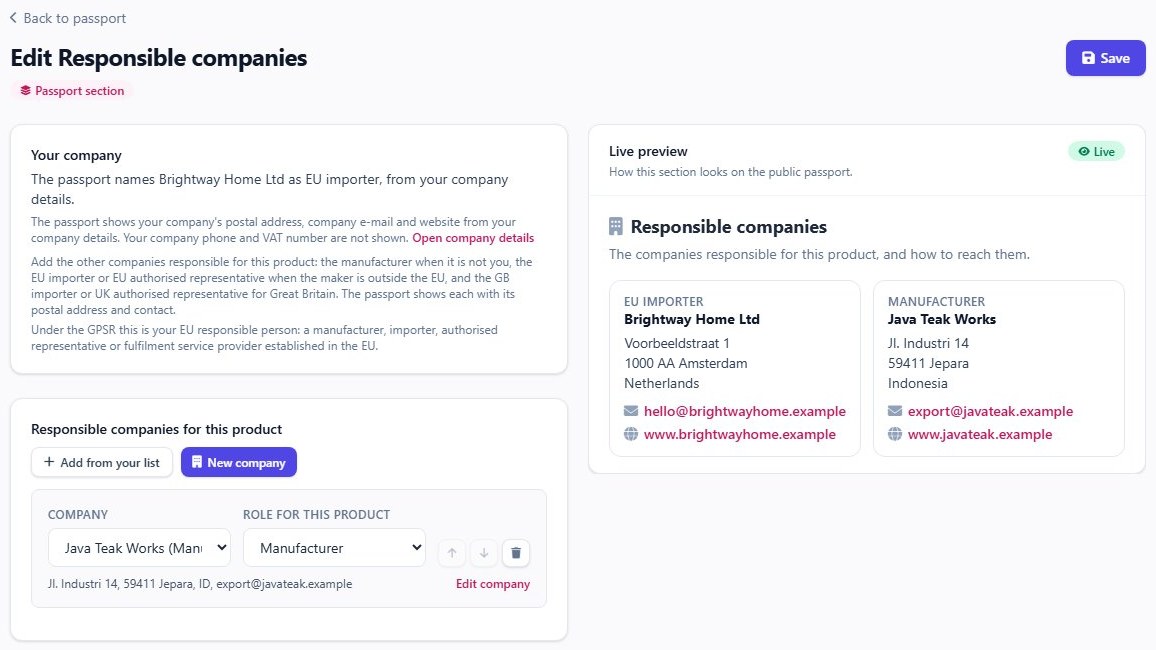
Two companies on the label, both named in the passport
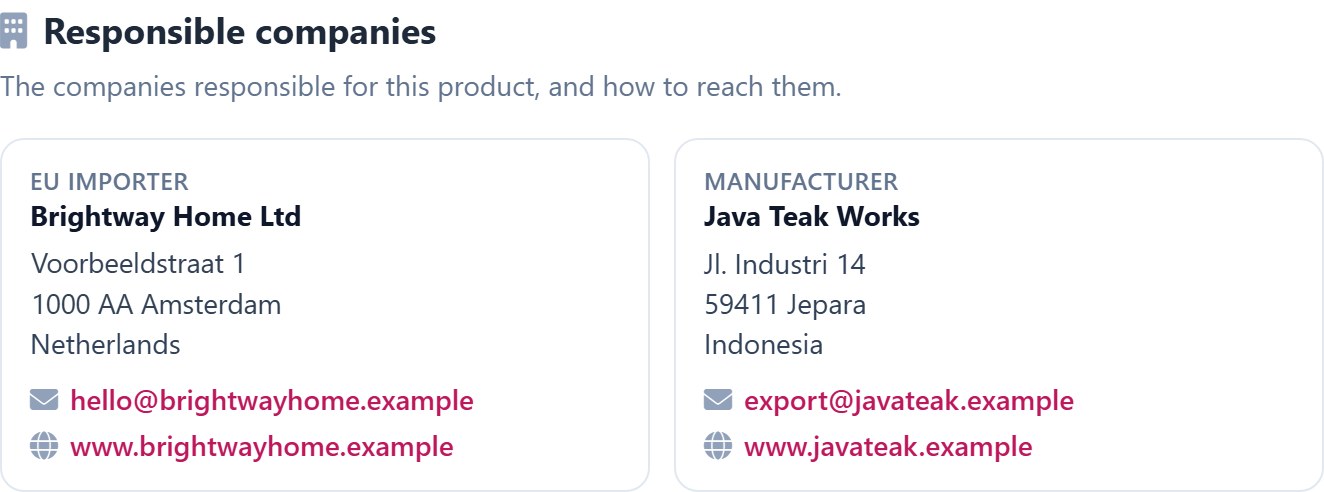
On the product, its packaging or an accompanying document go the maker's details and yours. In the passport, xProduct names the manufacturer and your company as importer and links to the maker's own passport when there is one. Add the Responsible companies section to show both companies' postal addresses and contacts.
Teams, Enterprise and Manufacturer · Responsible companies is a passport section
On the product or label
- CE marking where the law asks for it (UKCA or CE in Great Britain)
- The manufacturer's name, postal address and a type, batch or serial number
- Your name, registered trade name or trade mark, postal address and an e-mail or website
- Warnings, instructions and safety information in the local language
- A QR code to the passport, where a passport is required or you choose to give one
-
Manufacturer named
The maker's name and identifier, from the product's own page.
-
You as importer
Your legal name from Company details. In the Responsible companies section, with your postal address, as EU or GB importer.
-
The maker's passport
If the maker publishes its own passport, yours links to it.
-
Read by machines too
The passport API gives each company's role, such as manufacturer or importer.
04/Before you place it
A checklist for every product you bring in
Ask your supplier for these before the goods are placed on the market. Tick them off here as you read; nothing is saved.
05/Dates that matter
Passport and data deadlines that reach importers
Some duties already apply; others start on fixed dates. Dates marked * are our estimate, not yet fixed in law.
-
13 Dec 2024
General Product Safety Regulation Applies now
Consumer products in GPSR scope need a responsible company established in the EU, named on the product, its packaging, the parcel or an accompanying document. Online listings show the manufacturer and, if the maker is outside the EU, the EU responsible person, plus identifiers, a picture and warnings.
-
19 Jul 2026
Unsold clothing and footwear (ESPR) Applies now
Large companies may no longer destroy unsold clothing and footwear (medium-sized from 19 July 2030); this applies to importers too. Large companies must also disclose each year the unsold products they discard, first from 19 July 2025. Micro and small companies are exempt.
-
18 Aug 2026
Battery labels Applies now
From this date batteries carry the new labels (capacity, chemistry, hazards). Importers check them; their own name and address on the battery or its packaging is already required.
-
30 Dec 2026
Deforestation Regulation (EUDR) Fixed date
Due diligence and a statement in the EU information system for cattle, cocoa, coffee, oil palm, rubber, soya, wood and the listed products made from them (Annex I), such as many furniture, paper and leather goods. Micro and small companies from 30 June 2027, with exceptions. A review was due in 2026, so details may still change.
-
18 Feb 2027
Battery passport and QR code Fixed date
All batteries carry a QR code. LMT batteries, industrial batteries over 2 kWh and EV batteries also need a battery passport; the company placing the battery on the EU market, often the importer, is responsible for it and its data.
-
18 Aug 2027
Battery due diligence Fixed date
Supply-chain due diligence for larger companies placing batteries on the market (a turnover threshold applies; check whether you are in scope), postponed to this date in 2025.
-
2027–2028*
First ESPR product passports Estimate
Passport duties start only when a product group's own delegated act applies; none for a consumer product group applies yet. The first acts (iron and steel, textiles) may be adopted from around the end of 2026*, and their passport duties are expected to apply around 2027–2028*. Adoption and the date a duty applies are not the same. Importers will then check the passport is available.
-
1 Aug 2030
Toy Safety Regulation Fixed date
Regulation (EU) 2025/2509 applies: importers check that the toy's product passport exists and its data carrier is on the toy, and keep the documents and passport information for 10 years.
Importing steel, iron, aluminium, cement, fertilisers, hydrogen or electricity? The carbon border rules (CBAM) have applied in full since 1 January 2026: above a yearly threshold (50 tonnes) you need authorised CBAM declarant status, and the first annual declaration covers 2026 imports. CBAM is not part of the product passport.
06/How xProduct helps
Five steps from supplier documents to a code on the box
Set your role once, name the maker on each product, add the responsible companies, attach the maker's documents, then publish and print the code.
Say you import
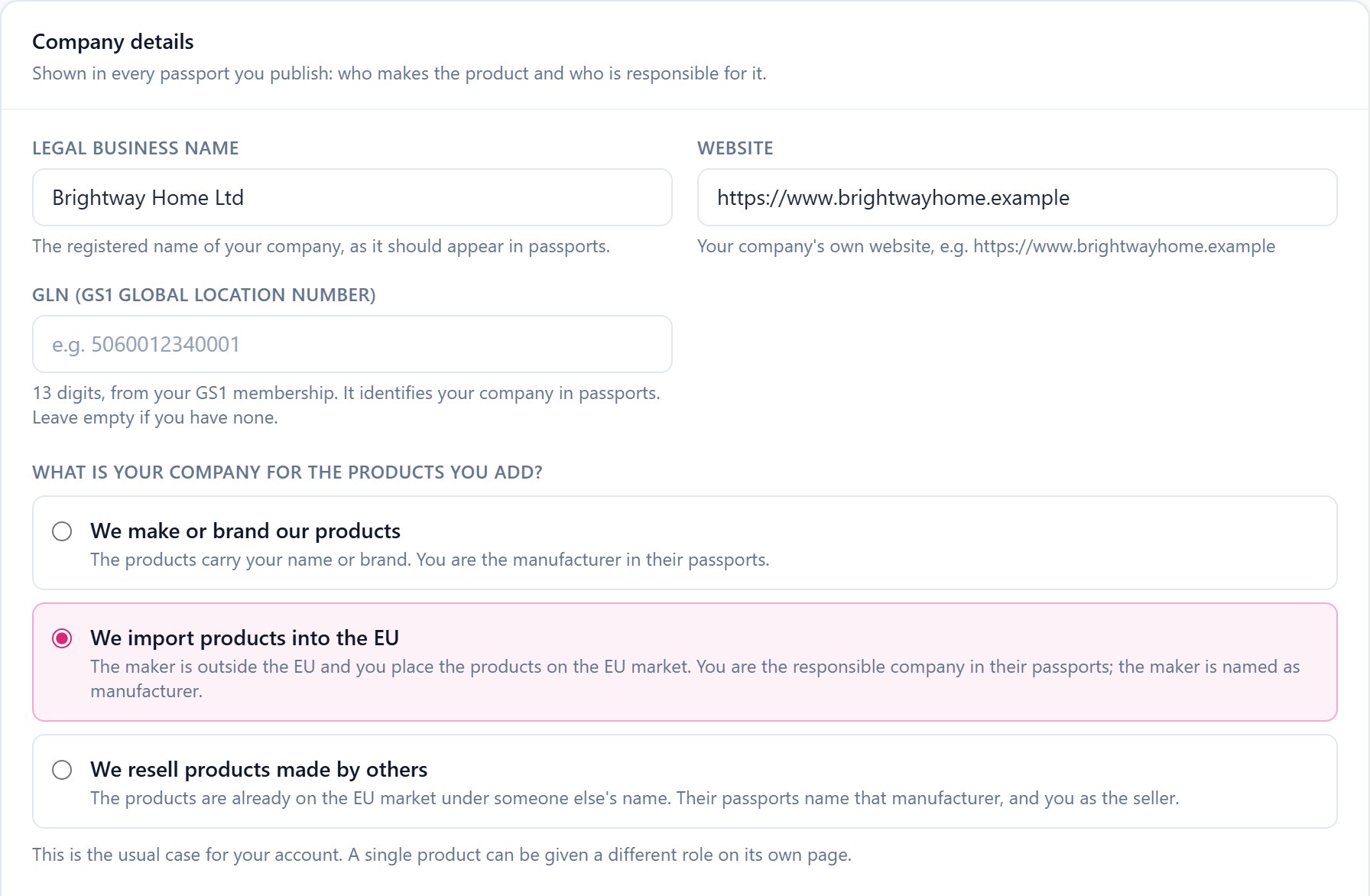
In Company details choose “We import products into the EU”. Your legal name and GLN then name you as the responsible company in every passport; add the Responsible companies section to show both companies' addresses.
Every plan
Company details: one question sets the usual role for your account. Name the maker on each product
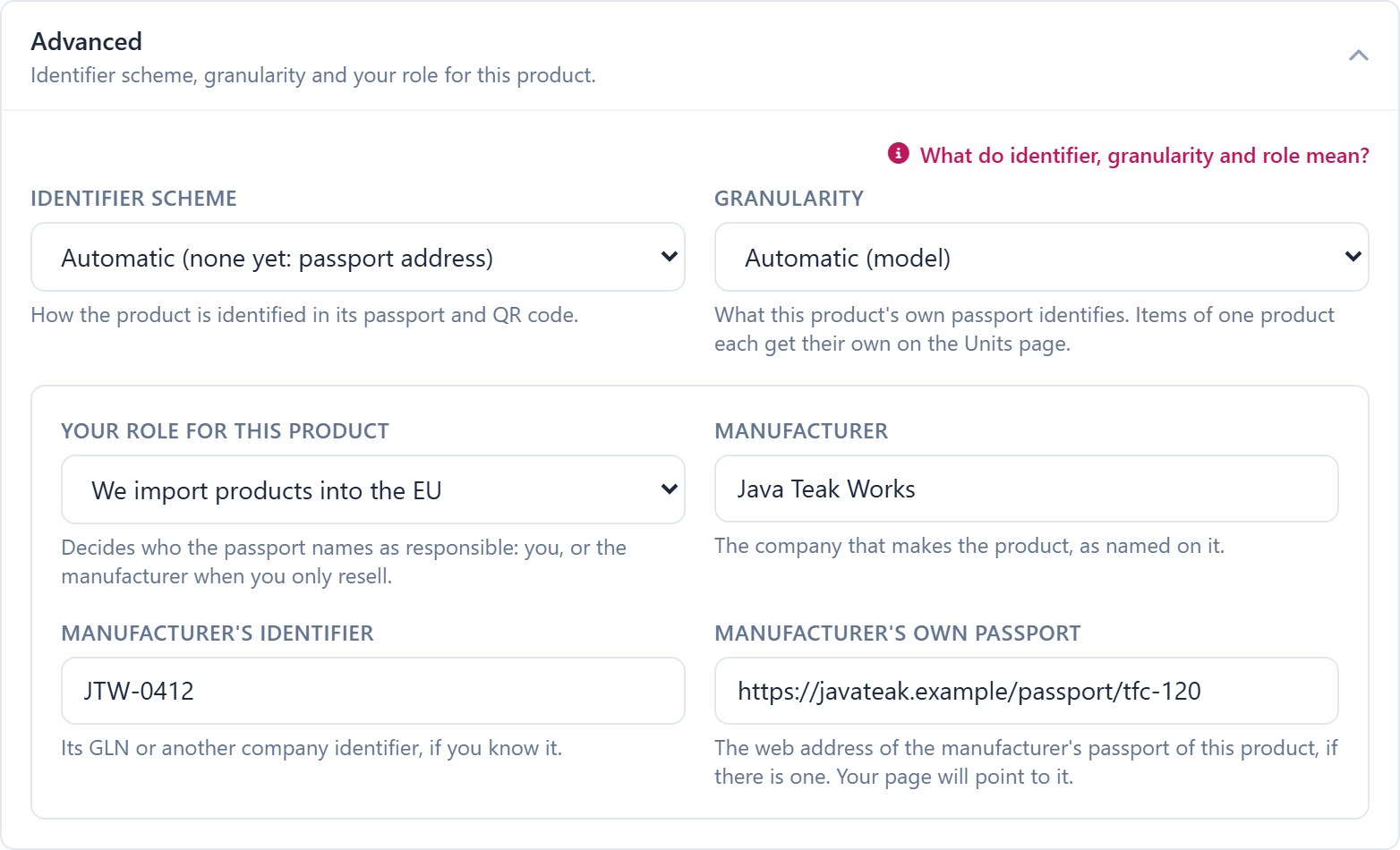
On the product's own page, give the manufacturer's name and identifier and, if the maker publishes one, the address of its own passport. Make some products yourself? Give those their own role.
Every plan
The maker, its identifier and its own passport, on the product page. Add the responsible companies
The Responsible companies section names your company and the maker with their postal addresses, and any EU or UK authorised representative or importer for the other market. The live preview shows the passport as you edit.
Teams, Enterprise and Manufacturer · Responsible companies is a passport section
Your company comes from Company details; add the maker and others from your list or as a new company. Attach the maker's documents
Upload declarations of conformity, test reports and certificates once, attach them to every product they cover, and see which run out soon. On paid plans AI reads the upload and fills in its details for you to check.
Every plan · AI pre-fill: paid plans
One library for every supplier document; you choose which are public. Publish and label
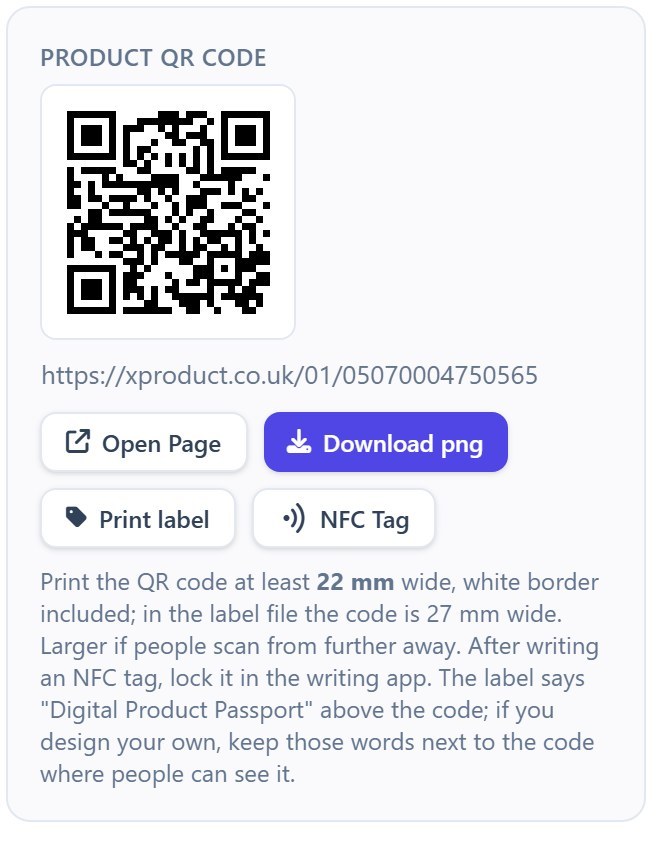
Publish the passport and put its QR code on the label next to your details: download it, print a ready label, write an NFC tag or order printed labels.
Paid plans
 Open the full-size picture
The QR code with the smallest size to print it at, a label and an NFC tag.

-
Barcode owner check
Kept the maker's barcodes? If GS1 lists them under another company, xProduct asks you to choose import or resell.
-
Every market's language
Add a language version of a passport for each market, and toy warnings in each language you sell in.
-
Kept for the passport's life
Every passport version by date, kept for the passport's lifetime under the same access rules as the current passport, and a ledger of every change, each entry linked to the one before.
-
Authority access
Market surveillance and customs can ask for restricted information from the public passport.
07/Your supplier's data
Four ways to get the maker's data in
Your supplier holds most of what the passport needs. Bring it in the way that suits each supplier.
- Every plan
Link the maker's passport
If the maker publishes a passport, add its address to the product; your passport points to it.
- Every plan
Upload their documents
Declarations of conformity, test reports and certificates into the library, attached to each product.
- Teams · Enterprise · Manufacturer
Import their product list
Up to 100 rows per spreadsheet; the same SKU updates the product. Shopify import too.
- Supplier on Manufacturer
Your supplier names you
If your supplier uses xProduct's Manufacturer plan, it can name you as EU or GB importer on its passport when it transfers the goods to you.
Passports are not copied from one account to another. Link to the maker's passport, or hold the product's passport yourself with your company named as importer. A product should have one passport, not two with different data.
08/Rules for importers
See which rules reach the products you import
In the Regulation Navigator, choose “We import products from outside the EU or UK”. The rules that apply then show in your account with their dates, and the rule pages say what importers must do. Guidance to fill gaps, not legal advice.
Paid plans · Regulation Navigator: free
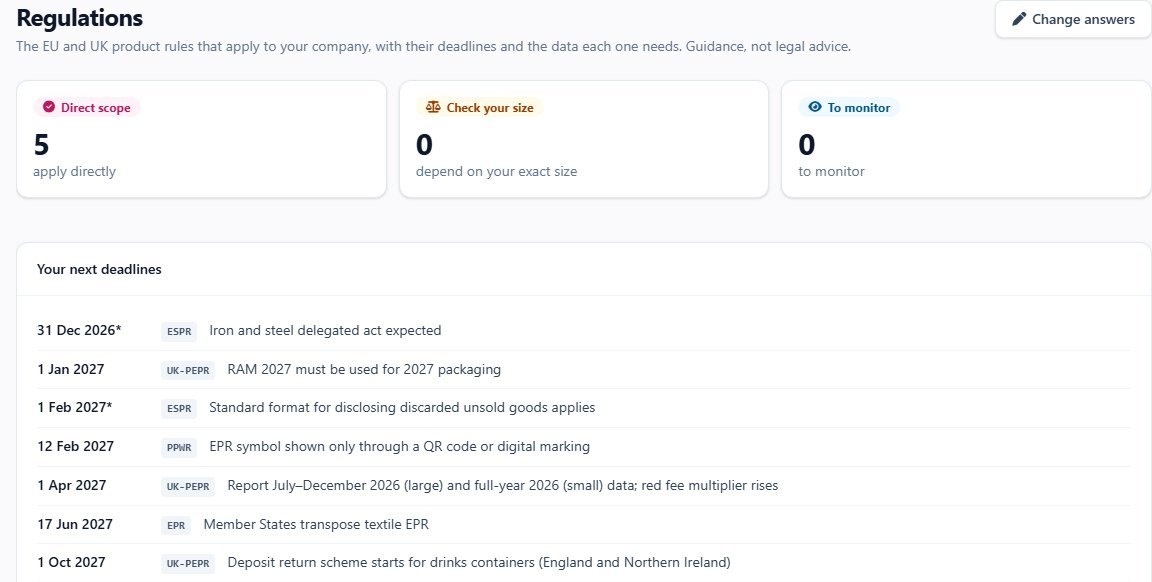
- Free · no account Regulation Navigator A few questions with the importer role already chosen, and the rules likely to apply, with their dates.
- Free Product rules library One page per rule: what it asks for, who it applies to and when.
- Enterprise · Manufacturer Rules for this product On each product: the data each rule needs, including the responsible companies, and what is already there.
09/Great Britain and Northern Ireland
Importing into the UK works differently
Great Britain has its own product rules; Northern Ireland follows EU product rules under the Windsor Framework.
Great Britain (England, Scotland, Wales)
- The EU GPSR does not apply; Great Britain keeps its own General Product Safety Regulations 2005. The importer is the GB company placing goods from outside the UK on the GB market.
- Check the maker has complied (UKCA or CE marking, documents) and give your own name and address: on the product, its packaging, an accompanying document or an adhesive label.
- CE marking is accepted indefinitely for 21 product regulations (gov.uk, 17 May 2024). Medical devices, construction products, marine, rail, cableways, transportable pressure equipment and drones have their own rules.
- No GB battery or toy passport duty is fixed yet; the Product Regulation and Metrology Act 2025 allows future rules.*
Northern Ireland
- EU product rules apply under the Windsor Framework: CE marking (with UKNI beside it where a UK body was used), the EU GPSR and the EU battery rules.
- Bringing goods into Northern Ireland from Great Britain can make you the importer for Northern Ireland; check the gov.uk guidance for your goods.
In the Responsible companies section and the passport API, a company in the UK is named GB importer and one in the EU is named EU importer. Add the importer or authorised representative for the other market in the same section. UK accounts are kept on xproduct.co.uk, EU accounts on xproduct.eu.
10/Live examples
Open a real passport
Two product groups with passport dates ahead: a wooden toy and an e-bike battery, as customers see them after scanning the code. They show the passport layout; neither is an imported product, so they do not show the importer block.

11/Plans
The importer role is on every plan
Choose by the number of products and people. The Manufacturer plan adds production, partners and transfers, and its recipients list of importers and representatives.
| Feature | Teams 19.99 € | Enterprise 39.99 € | Manufacturer 150 € |
|---|---|---|---|
| Products | 100 | 500 | 1,000 |
| Passport sections per product | 12 | 16 | 50 |
| Users | 2 | No set limit | All roles |
| Importer role, maker named per product, responsible companies | Included | Included | Included |
| Certificates library for supplier documents | Included | Included | Included |
| QR codes, NFC, label discount | Included | Included | Included |
| Spreadsheet import | Included | Included | Included |
| Rules and deadlines for your company | Included | Included | Included |
| Rules for this product | Not included | Included | Included |
| Serial-numbered items | 500 | 2,000 | 10,000 |
| Recipients list of importers and representatives, transfers | Not included | Not included | Included |
Monthly prices; Teams and Enterprise cost less with yearly billing. The Free and Starter plans are on the pricing page, which always shows the current prices and limits.
See pricing12/FAQ
Short answers
Another question? We are happy to answer it, or to show you the app in a short demo.
We buy from a factory in Asia and sell in Germany. Are we the importer?
If your company is established in the EU and is the first to place the product on the EU market, yes. If the product carries your own name or brand, you take on the manufacturer's duties instead.
Our supplier already has a passport. Do we need our own?
A product should have one passport. If the maker's passport covers the product and names you as importer, check it is complete and add its address on the product page; your xProduct page links to it as the manufacturer's passport. If there is no passport, or you are the company placing the product on the market (for batteries, that company is responsible for the passport), keep it in xProduct with your company named as importer. xProduct does not copy a passport from another account.
We import into both the EU and Great Britain. How does the passport show that?
In the Responsible companies section your company is named EU or GB importer from its country. Add the importer or authorised representative for the other market in the same section, with its address.
We import some products and make others. What do we choose?
Choose the usual case for your account in Company details, then give the other products their own role on each product's page.
Can xProduct hold our EORI number or customs codes?
Not at the moment. The passport names the companies and their addresses; customs declarations stay in your customs software.
Can authorities see more than the public passport?
A market surveillance or customs authority can ask for restricted information from the link at the foot of the public passport.
Does xProduct make our imports compliant?
No tool can promise that. xProduct helps you hold and show the evidence and shows which data is still missing. What a passport says remains your company's own statement; this page and the rules pages are guidance, not legal advice.
Where is our data kept?
On the site you sign up to: UK accounts on xproduct.co.uk with their data in the UK, EU accounts on xproduct.eu with their data in the EU.
Digital product passports for EU importers
Consumer products sold in the EU need a responsible company established in the EU, and product passports are arriving for batteries, toys and, product group by product group, under the Ecodesign Regulation. For an importer that means naming the maker, naming yourself and keeping the evidence. xProduct gives importers one place to hold that data, publish it behind a QR code and keep it up to date.
Sources: Blue Guide 2022; Decision 768/2008/EC; Regulation (EU) 2019/1020; GPSR (EU) 2023/988; Batteries Regulation (EU) 2023/1542; Toy Safety Regulation (EU) 2025/2509; ESPR (EU) 2024/1781; EUDR (EU) 2023/1115 as amended; CBAM (EU) 2023/956; gov.uk. This page is general guidance, not legal advice; check your sector law and the official texts.
Name the maker. Name yourself. Keep the proof.
Start free with one product and move up when you are ready, or book a demo and we will walk you through it with your own imports in mind.